
Marketplace
How Orbit Marketplace distributes Tours to Carriers via auctions and instant offers, plus how to read an offer's dispatch state (open, won, declined, revoked, expired).
How Orbit Marketplace distributes Tours to Carriers via auctions and instant offers, plus how to read an offer's dispatch state (open, won, declined, revoked, expired).
Was this article helpful?
Did not find your answer?
Ask Luna, or write to our support team.
Orbit Marketplace is a powerful platform feature that enables both automated and manual distribution of Tours to Carriers, matching the right Carrier at the right price. It serves as a central hub for managing transport opportunities through competitive auctions and fixed-price instant offers, providing operators with flexible tools to efficiently match Carriers with Tours.
Key Highlights
Auctions enable competitive bidding among carriers for transport opportunities. Orbit Marketplace supports two auction types:
Visible Auctions
Secret Auctions
Auction Configuration Options
When a carrier bids in Orbit Cockpit, they can choose how long that bid remains binding. They can use the auction end, an available preset, or a custom date and time. Orbit only offers deadlines that meet the marketplace minimum and, for an auction with an end time, do not pass that end.
A carrier with an active standing bid can update its binding deadline without changing the bid amount. When the deadline passes before the auction ends, that bid no longer participates in the auction.
Instant offers provide a direct, fixed-price proposition to specific carriers:
Sequences automate the entire matching process between Tours and Carriers in Orbit Marketplace. When set up carefully and tailored to specific cases, Sequences enable you to fully automate large parts of your Carrier-side operations. Every Sequence consists of three SequenceBricks. Each SequenceBrick can be managed individually and used in more than one Sequence, enabling you to re-use logic and procedures.
There are three types of SequenceBricks: Select, Score and Distribute. In a Sequence, they are executed in this order. First, a given number of Carriers are selected. Next, they are individually assigned a score. Finally, in the Distribution SequenceBrick, previously selected and scored Carriers are sent individual offers or are invited to competitive auctions using a user-defined workflow: a combination of Wait Steps and Actions.
Select SequenceBricks
The Select SequenceBrick allows Operators to create rules for choosing which Carriers will be processed by the sequence. You can apply multiple selection rules in combination. Select Rules considers all carriers present in the system at the time of execution.
Carriers can be filtered based on the following criteria:
Carrier
Carrier’s Vehicles
Carrier’s Users
The above filters can be set relative to either fixed values or dynamically using characteristics of the Tour in question like:
Score SequenceBricks
The Score Brick makes use of the same rules accessible by the Select SequenceBrick, but extends them with the option to either add or subtract a score to the carrier. This will help us to choose the carriers for a given step of the Distribute Brick according to their scoring.

Distribute SequenceBricks
The Distribute SequenceBrick is the workflow that sends the offers. It works through the scored carrier list in a chain of Wait Steps and Actions, each Action sending an instant offer or opening an auction for a slice of that list. The two step types are described below.
In the Distribute Brick you add a Wait Step (Add Wait Step) or an Action (Add Action).
A Wait Step sets a time the sequence waits, which is useful before or between Actions. The wait time can be set with either:
An Action consists of two parts, the carrier selection and the actual action to be executed.
The Carrier selection uses the previously created scored list of carriers and can be done in one of three ways:
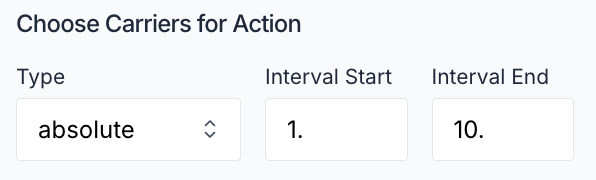
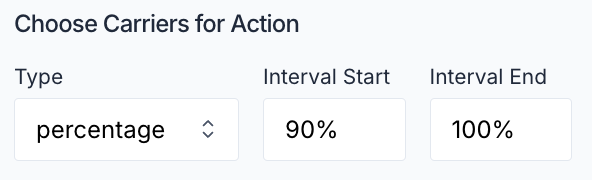
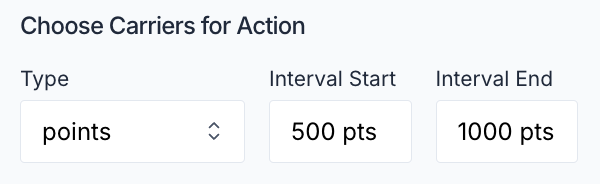
The setup for the execution of the action follows a similar pattern as the configuration of the Auction or Instant Offer in the Marketplace itself, here we set:
Instant Offer or Auction
Visible or Secret Auction
Price (initial price or suggested price)
an optional auction end
These settings allow for flexible design of the Distribute Brick of your sequence to:
Sequence Pattern Example:
1. Select top-scored (for example top 10%) carriers
2. Create auction for selected group
3. Wait for specified duration
4. If no acceptance, create instant offers at adjusted price
5. Distribute to remaining eligible carriersThe Marketplace implements a comprehensive notification system:
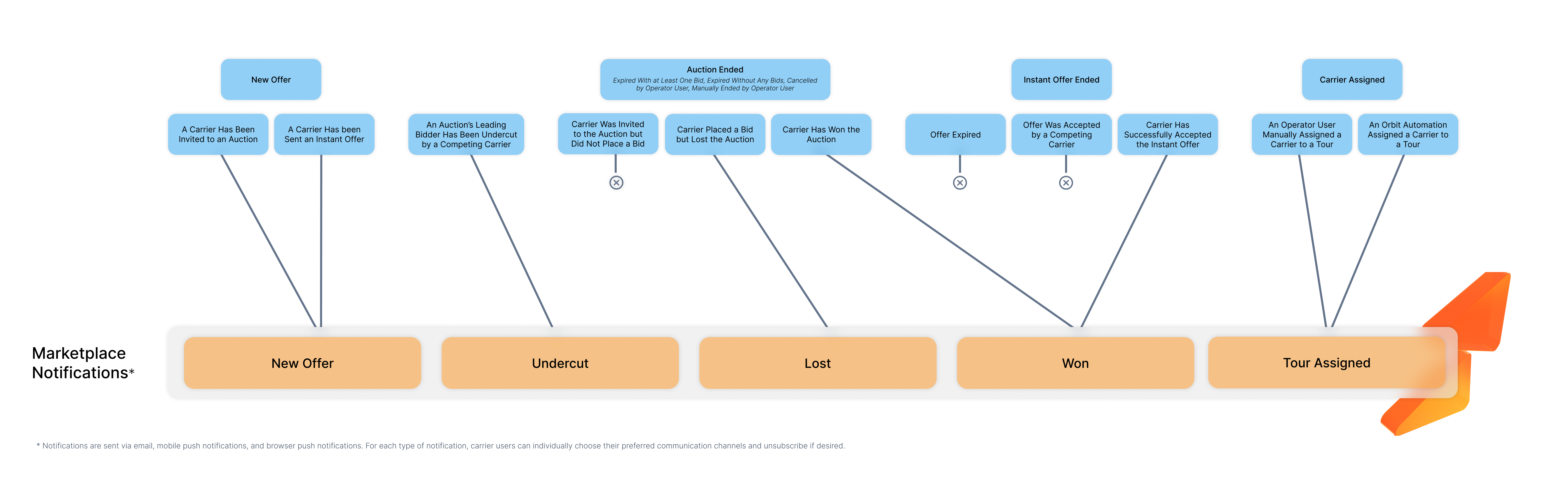
Channels:
Notification Types:
Carriers can customize their notification preferences for each type of communication channel.
Access to Marketplace features is managed through a granular permission system:
Sequence Management
Distribution Control
Monitoring and Oversight
Permissions are assigned through roles, which can be customized by operator administrators.
The Marketplace is the carrier-facing view, inside Orbit Connect, of the offers you have sent. Each offer for a Tour is a Callout, and carriers browse them through a set of tabs that are simply filtered lenses on the same offers:
A carrier only ever sees its own offer and its own rate, never the underlying order or the customer's pricing.
An individual offer moves through a small set of states. In plain terms:
These outcomes are not interchangeable, and the difference matters when you review why a tour did or did not find a carrier. Only Declined reflects a carrier's own decision. Revoked is your own action, and Expired simply means the offer timed out or was closed because someone else won. Neither is a rejection by the carrier.
Assignment itself is nothing more than the outcome of a won offer. You do not set a tour's carrier by hand while offers are running; when an offer is won, the tour is assigned to that carrier automatically. Until then the tour stays unassigned while its offers are live. A tour with an open offer is mid-dispatch, not overlooked.
Navigate to the Marketplace section in Orbit MissionControl
Select the tour
Select the carriers in the carrier table
Configure auction settings:
Launch the auction
Alternatively use the Quick Action Button to start an Auction with the tour price set as initial price.
Create Select Brick for carrier filtering:
Configure Score Brick for carrier ranking:
Set up Distribute Brick:
Combine bricks into sequence:
You can select your sequence in the Marketplace
Test and deploy:
Pronto Pizza, a chain with 25 locations across Madrid, uses Orbit Marketplace to manage their delivery operations efficiently during peak hours.
Scenario: During weekends, Pronto Pizza experiences high order volumes across all locations. They need to quickly dispatch drivers for time-sensitive deliveries while maintaining cost efficiency.
Marketplace Implementation:
Sequence Setup
Select Brick:
Score Brick:
Distribution Workflow
Results:
Orion Logistics, based in Singapore, manages container shipments between major ports in Asia and Europe. They use Orbit Marketplace to coordinate with trucking providers for final-mile deliveries.
Scenario: When cargo vessels arrive at the Port of Rotterdam, Orion needs to arrange transportation to distribution centers across Western Europe, with varying urgency and price sensitivity.
Marketplace Implementation:
Tiered Distribution Strategy
Automated Sequence for Standard Container Delivery
Select Brick: Filters for carriers with:
Score Brick:
Distribute Brick:
Results:
Sequences currently allow a maximum of 2000 selected Carriers
The auction can be manually ended by the operator, or it will automatically end at its configured end time if one was set. The tour can then be redistributed through a new auction, instant offer or direct assign to carrier.
Active auctions cannot be modified, but they can be ended manually if needed and a new distribution can be started.
Carriers receive notifications through their configured channels (email, push, in-app). They can manage their notification preferences in their account settings.
The system processes acceptances in order of receipt. Once an offer is accepted, it is automatically withdrawn from other carriers.
Yes, through sequences you can create sophisticated distribution strategies combining both auctions and instant offers with conditional logic and timing rules.